
Immigration PDF Guide
Compress PDF for IRCC Upload
If you are uploading documents for immigration, visa, study permit, work permit, PR, or citizenship applications, your PDF files may need to stay under a specific file size limit. Compressing the PDF can help you prepare your documents before upload.
By GaryLast updated
Need a smaller PDF?
Use PDFAreUs to reduce the size of scanned documents, forms, certificates, and application files.
Compress PDF NowCommon documents people compress
- Passport scans
- Immigration forms
- Proof of funds
- Education documents
- Employment letters
- Marriage or birth certificates
- Combined supporting documents
How to prepare your PDF
- Scan each document clearly, or photograph it on a flat surface in good light, and save it as a PDF.
- Find the limit for your upload in the table below, and on your own application screen.
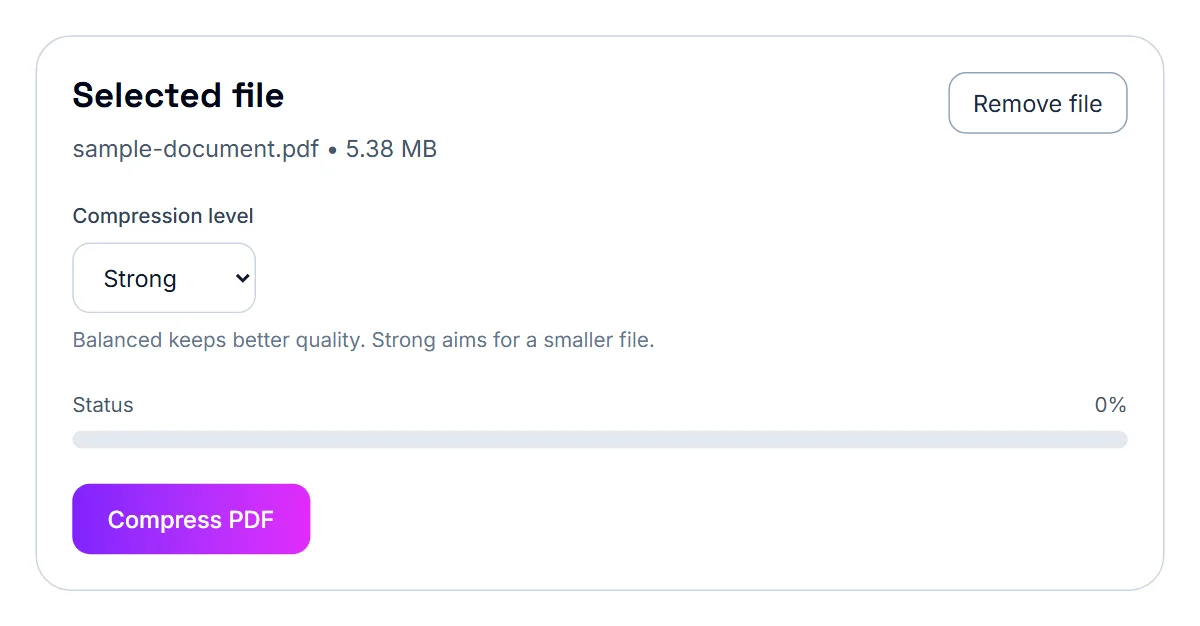
- Open Compress PDF, select Select PDF File and choose the document. The tool shows its current size.
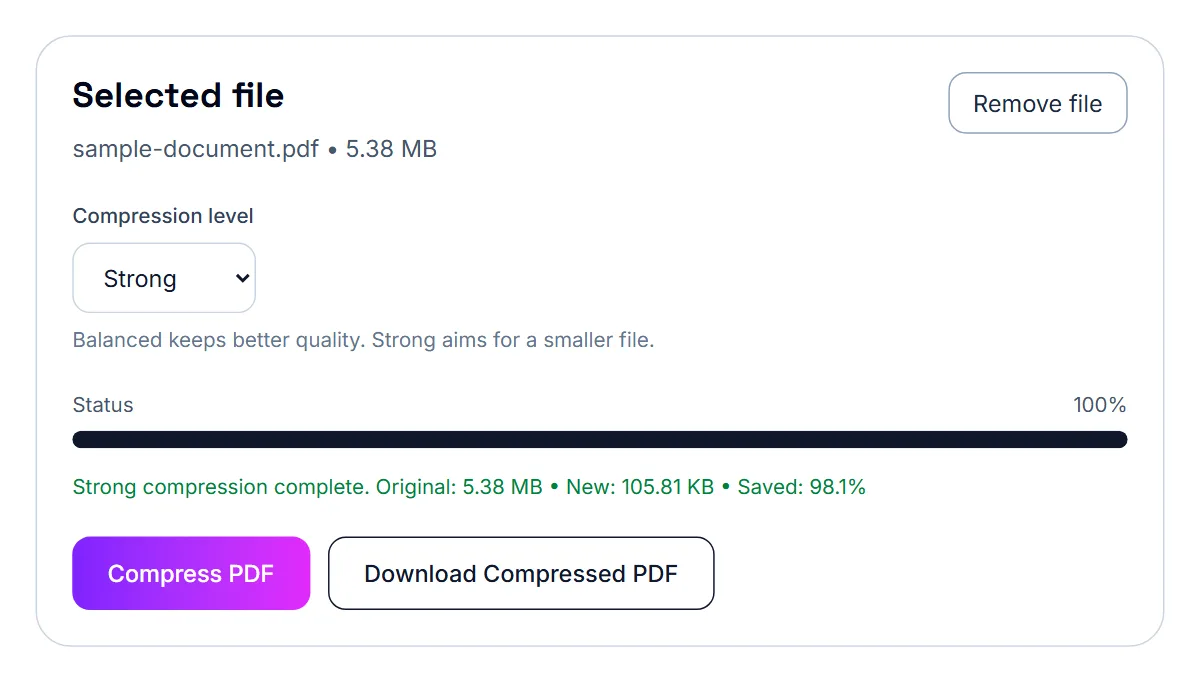
- Keep Compression level on Balanced and select Compress PDF. The status line shows the new size.
- If the new size is under the limit, select Download Compressed PDF. If not, switch to Strong and compress again.
- Open the downloaded copy and zoom in on names, dates, document numbers and stamps, then upload it.
Portal file size limits
Every figure below comes from the official page linked next to it. Portals change their limits, so confirm on the portal before you submit.
| Portal | Document | Limit | Source |
|---|---|---|---|
| IRCC secure account | Each uploaded file | 4 MB | IRCC Help Centre: file size limits |
| IRCC Portal (including the new version) | Each uploaded file | 5 MB | IRCC Help Centre: file size limits |
| Permanent Residence Portal | Each uploaded file | 4 MB | IRCC Help Centre: file size limits |
| Online citizenship application | Each uploaded file | 4 MB | IRCC Help Centre: file size limits |
- IRCC Help Centre: file size limits: checked
Important reminder
Always check the official upload instructions on the government or application portal you are using. File limits and document requirements can change, so confirm the latest rules before submitting.
Quality tip
Do not over-compress documents if it makes names, dates, stamps, or signatures difficult to read.
Where the IRCC limits come from
IRCC’s Help Centre lists a per-file limit that depends on which account or portal you use, shown in the table above with a link to the source. Check the instructions on your own application screen too: some document types have their own rules, and the instructions for a document can be stricter than the general limit.
One field, several documents
Some applications give you a single upload field for what is really several documents, such as a set of bank statements or several pages of a passport. Merge them into one PDF in a sensible order, then compress the merged file so it fits the per-file limit.
Keep scans legible
An officer has to be able to read names, dates, stamps and passport numbers. Use the Balanced compression level first, zoom in to check the small print, and only use Strong if the file is still over the limit. If even Strong is not enough, remove pages that were not requested or split the document if the portal allows more than one file.
Scans shrink, downloaded PDFs mostly do not
Compress PDF makes a file smaller by redrawing each page as an image. A passport scan or a photographed certificate shrinks a great deal. A bank statement or pay stub downloaded as a PDF is already compact text, and compressing it turns that text into a picture without saving much. Leave downloaded documents alone unless they are over the limit, and when a long statement is too large, keep only the months you were asked for.
Translations and multi-part documents
When a document is not in English or French, the translation and the papers that go with it are normally uploaded in the same field as the original. Put them in one PDF in the order the document checklist gives, so nothing is separated. In Merge PDF every page appears as a thumbnail, which lets you move a page, turn one that is sideways, or drop a blank back page before you combine the files.
A two-minute check before you upload
- The file is under the limit shown for that upload, with a little room to spare.
- Every page is upright and in order, and both sides of two-sided documents are included.
- Names, dates, document numbers and stamps are readable at normal zoom.
- The file is not password-protected. An officer cannot open a locked file.
- The file name says what the document is, such as passport-bio-page.pdf.
If it still doesn't work
- Still over the limit on Strong: remove pages that were not requested with Remove Pages. If the portal lets you add more than one file for that document, split it with Split PDF.
- A merged file is too large: compress each document first, then merge the compressed copies, and check the merged size.
- The portal rejects the file for another reason: read the message. Check the file type (PDF), and rename the file to plain letters, numbers and hyphens.
- Details are blurry after compressing: compress the original again with Balanced, or rescan in greyscale at a normal document resolution.
- “This PDF did not get smaller”: the document is mostly text and already compact. If it is still over the limit, it is long; remove or split pages.
Frequently asked questions
Will compression affect how IRCC reads my document?
The pages look the same, but they are stored as images, so text cannot be selected in the compressed copy. What matters is that an officer can read every detail, so check the copy at full zoom.
Should I compress documents that are already under the limit?
No. Upload the original if it fits; it is the clearest version you have.
Privacy
Immigration documents are sensitive. PDFAreUs compresses and merges files in your browser, so your passport, statements and certificates are never uploaded to our servers before you submit them to IRCC yourself.
About the author
Gary
Gary builds and runs PDFAreUs and writes its guides, which explain how to prepare PDFs for email, job applications, school and government portals using tools that run in your browser.
More about Gary and PDFAreUs